

Have you ever opened Google Maps, zoomed in on your neighborhood, and discovered that your home appears blurred while the rest of the street looks perfectly clear? It can be surprising, even unsettling, especially if you don’t remember requesting any changes. The good news is that there are clear reasons why this happens — and options available if you want to take action.
TLDR: Homes on Google Maps may be blurred due to privacy requests, automatic blurring by Google, or regional privacy laws. Property owners can request blurring through Google Street View, but the change is permanent once approved. If your home is blurred and you didn’t request it, it may be due to a previous owner or a privacy-related flag. Understanding how Google captures and processes images can help you decide whether to leave it blurred or explore other options.
How Google Maps and Street View Capture Images
To understand why your home may be blurred, it’s helpful to first understand how Google collects its imagery. Google Street View vehicles are equipped with multi-lens cameras mounted on top of cars. These cameras capture 360-degree images as they drive through neighborhoods. The data is then stitched together and published as interactive panoramic views.
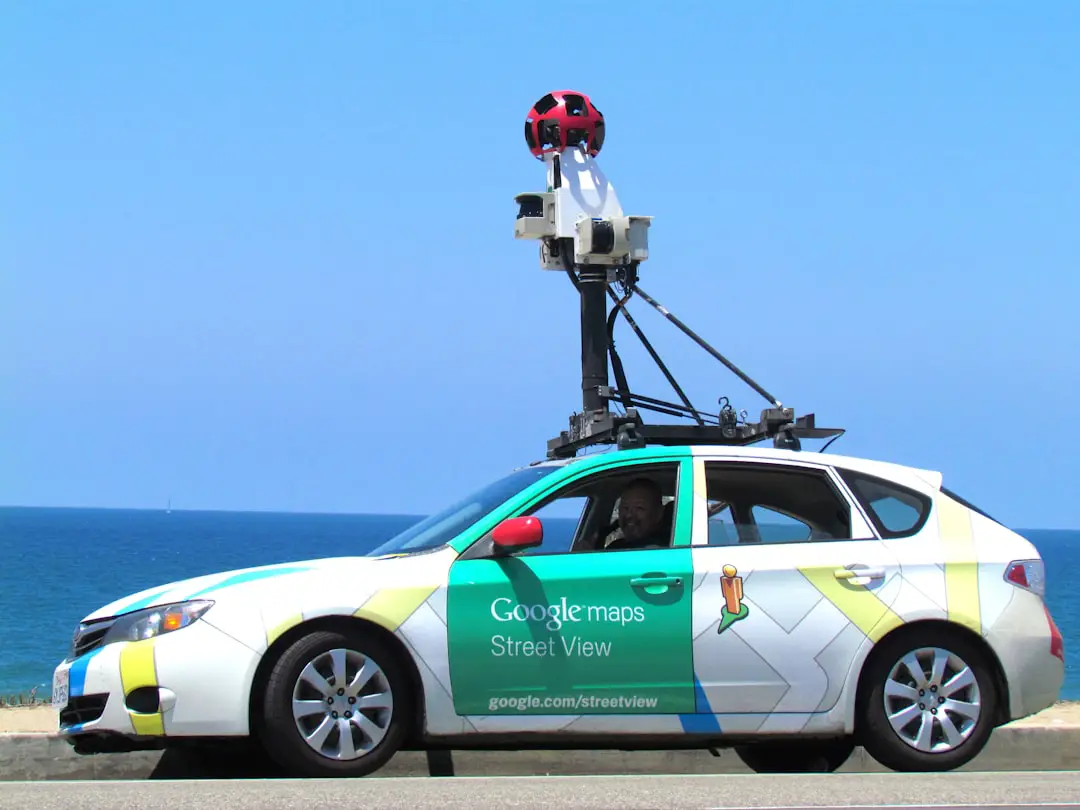
Google also uses:
- Trekker backpacks for hard-to-reach areas
- Drones and partnerships in select regions
- User-contributed photos uploaded voluntarily
Before publication, Google runs automated systems to detect and blur sensitive content such as:
- Faces
- License plates
- Other personally identifiable information
In some cases, entire homes are blurred — and that’s where things get interesting.
Reason #1: A Homeowner Requested Privacy Blurring
The most common reason a house is blurred is simple: someone asked Google to blur it.
Google allows property owners and residents to request that their home be obscured in Street View. The process is relatively straightforward:
- Open Google Maps and navigate to the Street View of the property.
- Click “Report a problem” in the lower corner.
- Select the area to blur (home, car, or other object).
- Submit the request along with contact information.
Once approved, the blurring is permanent. This is an important detail. Google clearly states that blurring cannot be reversed after it is applied.
Even if you later change your mind, the blur cannot be removed.
Sometimes current homeowners are surprised to find their house blurred because:
- A previous owner made the request.
- A tenant submitted the request.
- A neighbor mistakenly included the property in their report.
Because the blurring is permanent, ownership changes do not automatically restore the image.
Reason #2: Automatic Blurring by Google
Google uses advanced image-processing algorithms to automatically blur sensitive information. While the system primarily targets faces and license plates, errors can happen.
Occasionally, Google’s AI may:
- Misidentify parts of a home as sensitive information.
- Over-blur areas due to reflective surfaces or unusual architecture.
- Apply blur too broadly after a partial privacy request.
For example, reflective windows, house numbers, or signage can trigger automated detection systems. In rare instances, the entire structure ends up obscured.
Reason #3: Local Privacy Laws and Cultural Norms
Privacy laws vary significantly around the world. In some countries, data protection regulations are stricter than in others. European nations, in particular, operate under strong privacy frameworks such as the GDPR (General Data Protection Regulation).
In certain regions:
- Blurring homes is more common due to resident concerns.
- Local authorities may pressure mapping services for greater privacy controls.
- Cultural standards discourage public display of residential properties.
As a result, entire neighborhoods in some countries may appear partially blurred.
Can You Unblur Your Home?
This is one of the most frequently asked questions — and unfortunately, the answer is usually no.
Google’s official policy states that once a home is blurred, the action is irreversible. The reasoning is privacy protection. If Google allowed reversals freely, it would undermine the trust of individuals who requested anonymity.
However, there are a few limited scenarios worth noting:
- If the blur is clearly an error, you can submit a new “Report a problem” request.
- If only part of the image is distorted due to an AI mistake, Google may refine it.
- If updated imagery is captured years later, the blur may still carry forward automatically.
In most standard cases, though, a blur remains in place permanently.

Does Blurring Affect Property Value?
This question sparks debate among homeowners and real estate professionals.
There is no clear evidence that a blurred home directly lowers property value. However, there are considerations:
- Curb appeal visibility: Buyers browsing neighborhoods online may notice the blur.
- Perception questions: Some people may wonder why the house is blurred.
- Privacy appeal: Others may see it as a positive privacy feature.
In competitive real estate markets, agents typically use professional listing photos anyway, which reduces reliance on Street View imagery.
Should You Blur Your Home?
If your home is not blurred, you might wonder whether you should request it. The answer depends on your comfort level with public visibility.
Reasons people choose to blur their homes:
- Privacy concerns
- Past stalking or harassment experiences
- High-profile status
- Security considerations
Reasons people choose not to blur:
- A home’s exterior is already publicly visible from the street.
- Blurring can attract curiosity.
- They see no added practical benefit.
It’s worth remembering that Street View only captures what is visible from public roads. It does not peer into windows or access private areas beyond public sightlines.
How to Check If a Blur Request Was Made
If you recently bought a house and discovered it’s blurred, you cannot directly see who made the request due to privacy policies. However, you can:
- Ask the previous owner during closing (if possible).
- Check archived Street View imagery to see when the blur first appeared.
- Compare older map versions for changes over time.
Google Street View includes a “See more dates” feature on desktop that lets you view older captures of the same location. This tool can reveal when the property first became blurred.
What About Other Mapping Services?
Google isn’t the only mapping provider. Alternatives include:
- Apple Maps Look Around
- Bing Maps Streetside
- OpenStreetMap (community driven)
If privacy is your goal, you may need to check each platform individually. Blurring on Google Maps does not automatically apply to other services.
Security Myths vs. Reality
There is an ongoing debate about whether blurring actually increases security.
Common myth: “If my house is blurred, criminals can’t see it.”
Reality: Anyone physically near the property can still observe it from the street. Street View images may also be several years old, meaning they don’t reflect current security systems or changes.
Security experts often suggest that practical measures — alarm systems, cameras, good lighting — are far more effective than digital obscurity.
The Bottom Line
If your home is blurred on Google Maps, it is most likely the result of a privacy request — either by you, a previous resident, or someone acting cautiously. Automatic systems and privacy regulations can also play a role. While you generally cannot reverse a blur once it’s applied, you can investigate when it happened and decide whether additional actions are necessary.
Ultimately, Google Maps operates at the intersection of public information and personal privacy. The presence — or absence — of a blur reflects a balance between visibility and discretion. Whether you see it as a protective measure or a digital curiosity, understanding the reasons behind it gives you control over how your home appears to the world.